

WP-CLIを使ったバッチ翻訳の実行
WP-CLI とbashスクリプトを使って、翻訳をバッチで実行できます。これにより、別の作業をしている間にバックグラウンドで翻訳を実行できます。
そのために、次の2つのbashスクリプトを作成します:
- バッチ処理のロジックを含むメインスクリプト(変更不要)
- 翻訳する対象を定義する設定ファイル(翻訳実行のたびに更新)
メインスクリプト
翻訳処理のロジックを含む gatotranslate.sh というファイルを作成します(サンプルをダウンロード):
gatotranslate コマンドに渡すパラメーターはカスタマイズできます(例:--status-to-update=draft、--status-when-translated=same-as-origin、--parts=properties など)。
#!/bin/bash
# ------------------------------------------------------------------------------------------------
# Load configuration
# ------------------------------------------------------------------------------------------------
SCRIPT_DIR="$(cd "$(dirname "${BASH_SOURCE[0]}")" && pwd)"
source "${SCRIPT_DIR}/gatotranslate.config.sh"
# ------------------------------------------------------------------------------------------------
# Arguments
# ------------------------------------------------------------------------------------------------
# (Optional) Provide the start batch number as an argument, default is 1
start_batch=${1:-1}
# ------------------------------------------------------------------------------------------------
# Logic
# ------------------------------------------------------------------------------------------------
batch_size=${batch_size:-1} # If not provided, default to 1
total_items=${#items[@]}
total_batches=$(((total_items + batch_size - 1) / batch_size))
start_batch_index=$(((start_batch - 1) * batch_size))
echo "----------------------------------------"
echo "Translating $subcommand items"
echo "----------------------------------------"
echo "Batch size: $batch_size"
echo "Total items: $total_items"
echo "Total batches: $total_batches"
echo "Starting from batch number: $start_batch"
echo "----------------------------------------"
for ((start=start_batch_index; start<total_items; start+=batch_size)); do
# Get the next batch of items
batch=("${items[@]:$start:$batch_size}")
echo "Processing batch #$((start/batch_size + 1))"
# Pass all items in the batch as separate arguments
cmd=$(printf 'wp gatotranslate %s "%s" --status-to-update=any --user=%s' "$subcommand" "${batch[*]}" "$user")
echo "Command: $cmd"
eval $cmd
exit_code=$?
if [ $exit_code -ne 0 ]; then
echo -e "\a\a\a\a\a"
exit 1
fi
done
# Finished successfully
echo -e "\a"
echo "----------------------------------------"
echo "Finished successfully 👏"
echo "----------------------------------------"設定ファイル
バッチ翻訳の設定を含む gatotranslate.config.sh というファイルを作成します(サンプルをダウンロード):
user="admin"
subcommand="post"
batch_size=1
items=(
4118
4117
4116
3739
)このファイルには以下の変数を含める必要があります:
| 変数 | 説明 |
|---|---|
user | コマンドを実行するWordPressのユーザー名(通常は admin) |
subcommand | 実行する gatotranslate WP-CLIサブコマンド(post、media、term、または menu) |
batch_size | 各バッチで翻訳するアイテム数(デフォルトは 1) |
items | 翻訳するアイテムのIDの配列(投稿、タグ、カテゴリー、メディア、メニューなど) |
スクリプトの実行
wp コマンドが使用できるWordPressのルートディレクトリから実行してください。
バッチ翻訳を実行するには、次のコマンドを実行します:
bash +x gatotranslate.shスクリプトは、すべてのアイテムに対して指定したバッチサイズで gatotranslate コマンドを実行し、各バッチの進捗情報を表示します。
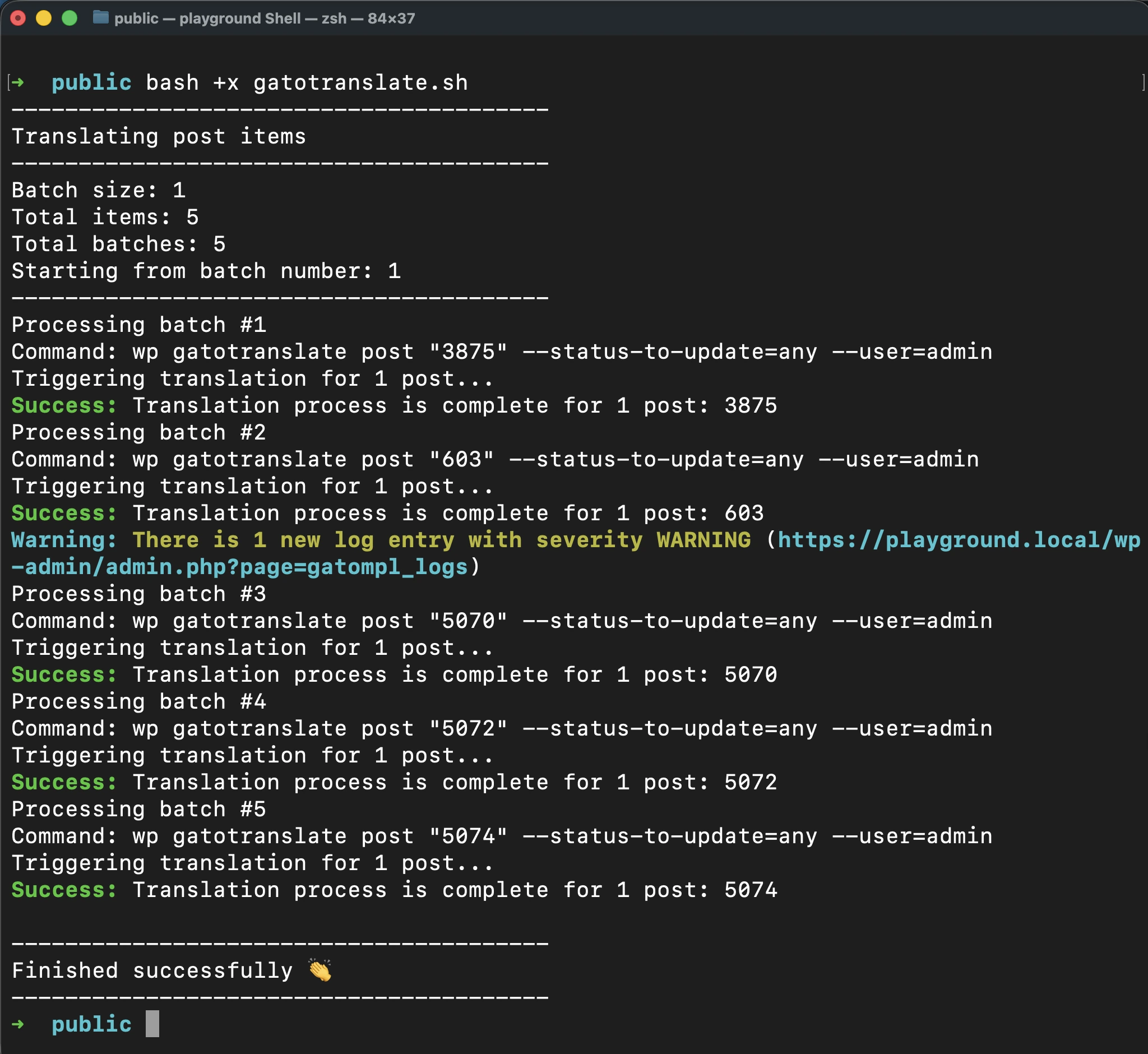
スクリプトが正常に終了すると、単一のビープ音が鳴ります。
エラー発生時の実行停止
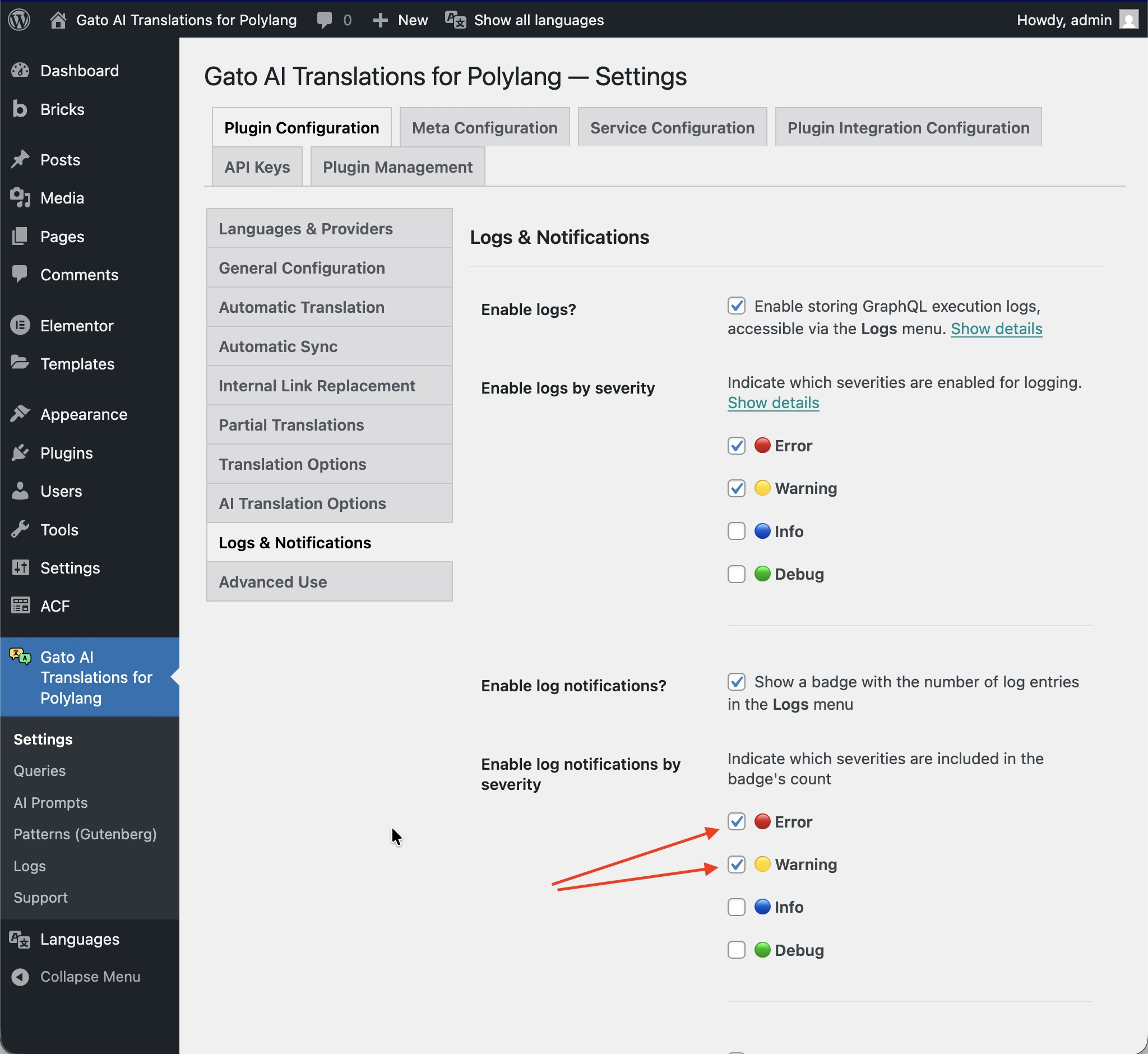
ログにエラーや警告が追加されるたびにスクリプトを自動停止させるには、gatotranslate.sh 内のコマンドに --fail-if-log-notifications パラメーターを追加します:
cmd=$(printf 'wp gatotranslate %s "%s" --fail-if-log-notifications --status-to-update=any --user=%s' "$subcommand" "${batch[*]}" "$user")スクリプト停止をトリガーするログ通知の深刻度は、Settings > Plugin Configuration > Logs & Notifications ページで設定されているものが適用されます。
ログ通知によってスクリプトが停止すると、長いビープ音のシーケンスが鳴ります。
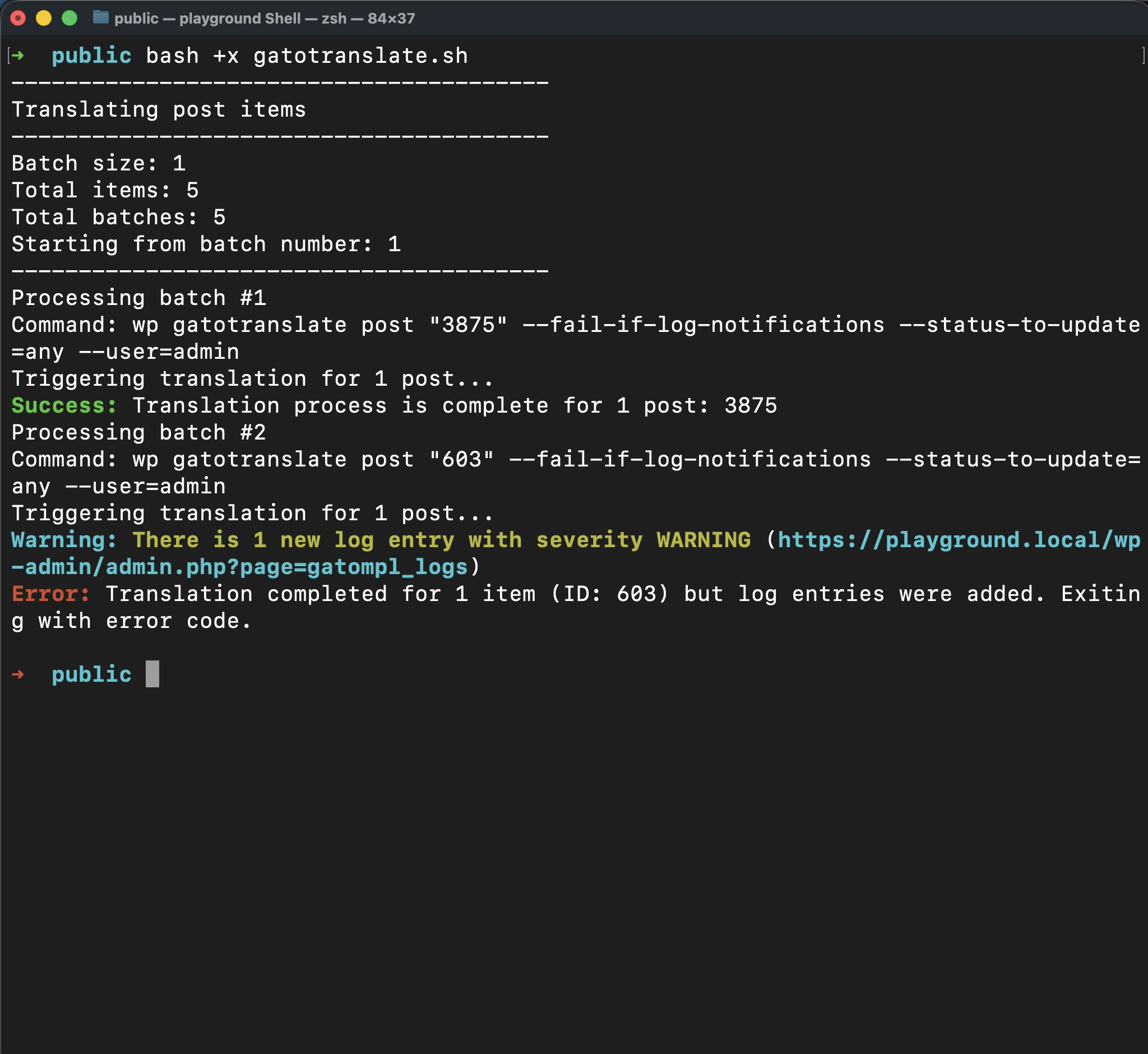
問題を修正した後は、バッチ番号を引数として渡すことで、失敗した地点から翻訳を再開できます。
これにより、すでに正常に翻訳されたアイテムを再処理することなく、時間とAPI クレジットの両方を節約できます。
たとえば、バッチ 2 で失敗が発生した場合、問題を修正した後に次を実行します:
bash +x gatotranslate.sh 2応用:翻訳対象アイテムのIDの取得
バッチ翻訳を設定する際、翻訳するアイテムのIDを知る必要があります。
プラグインは内部で Gato GraphQL を実行しているため、GraphQLクエリを実行してこの情報を便利に取得できます。
GraphQLクエリを実行するには、まず Advanced Mode を有効にして Queries CPT にアクセスする必要があります。Advanced Modeを有効にする方法については、ヘルパークエリの作成を参照してください。
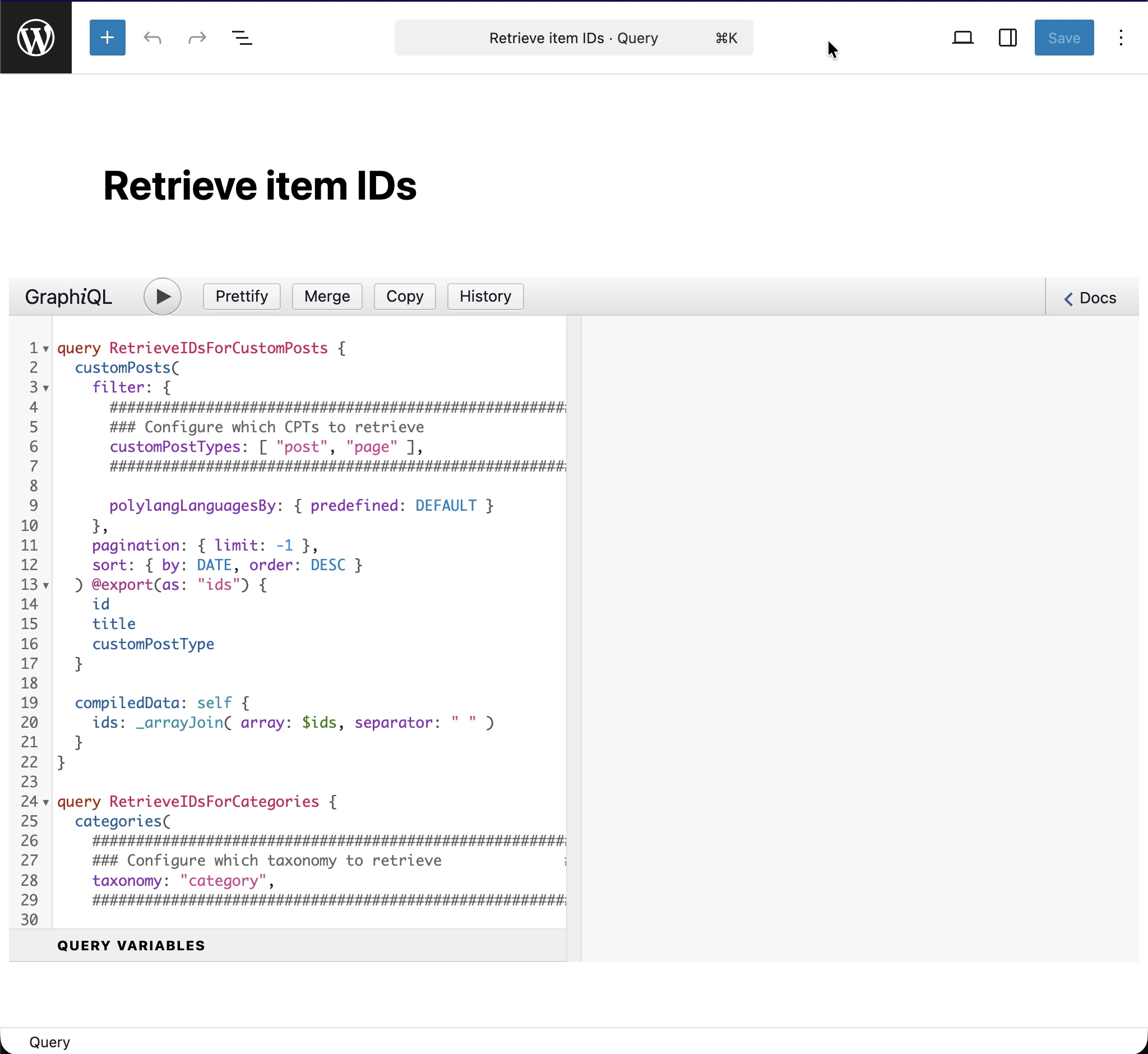
Queries に新しいエントリーを追加し、タイトルを Retrieve item IDs として、次のGraphQLクエリを入力します:
query RetrieveIDsForCustomPosts {
customPosts(
filter: {
#########################################################
### Configure which CPTs to retrieve ###
customPostTypes: [ "post", "page" ],
#########################################################
polylangLanguagesBy: { predefined: DEFAULT }
},
pagination: { limit: -1 },
sort: { by: DATE, order: DESC }
) @export(as: "ids") {
id
title
customPostType
}
compiledData: self {
ids: _arrayJoin( array: $ids, separator: " " )
}
}
query RetrieveIDsForCategories {
categories(
#########################################################
### Configure which taxonomy to retrieve ###
taxonomy: "category",
#########################################################
filter: { polylangLanguagesBy: { predefined: DEFAULT } },
pagination: { limit: -1 },
sort: { by: NAME, order: DESC }
) @export(as: "ids") {
id
name
taxonomy
}
compiledData: self {
ids: _arrayJoin( array: $ids, separator: " " )
}
}
query RetrieveIDsForTags {
tags(
#########################################################
### Configure which taxonomy to retrieve ###
taxonomy: "post_tag",
#########################################################
filter: { polylangLanguagesBy: { predefined: DEFAULT } },
pagination: { limit: -1 },
sort: { by: NAME, order: DESC }
) @export(as: "ids") {
id
name
taxonomy
}
compiledData: self {
ids: _arrayJoin( array: $ids, separator: " " )
}
}
query RetrieveIDsForMedia {
mediaItems(
filter: { polylangLanguagesBy: { predefined: DEFAULT } },
pagination: { limit: -1 },
sort: { by: DATE, order: DESC }
) @export(as: "ids") {
id
title
}
compiledData: self {
ids: _arrayJoin( array: $ids, separator: " " )
}
}
#################################################################################################
# Watch out: This will bring all menus, not just the ones in the origin language.
# Translated menus are those with a location containing the "___" string,
# e.g.: "header___es", "footer___fr", etc.
#################################################################################################
query RetrieveIDsForMenus {
menus(
pagination: { limit: -1 },
sort: { by: NAME, order: DESC }
) @export(as: "ids") {
id
name
locations
}
compiledData: self {
ids: _arrayJoin( array: $ids, separator: " " )
}
}
翻訳したいエンティティに応じて、クエリの対応するオペレーションを設定して実行する必要があります。
たとえば、投稿カテゴリーのIDを取得するには、タクソノミー category を引数として渡して RetrieveIDsForCategories オペレーションを実行する必要があります:
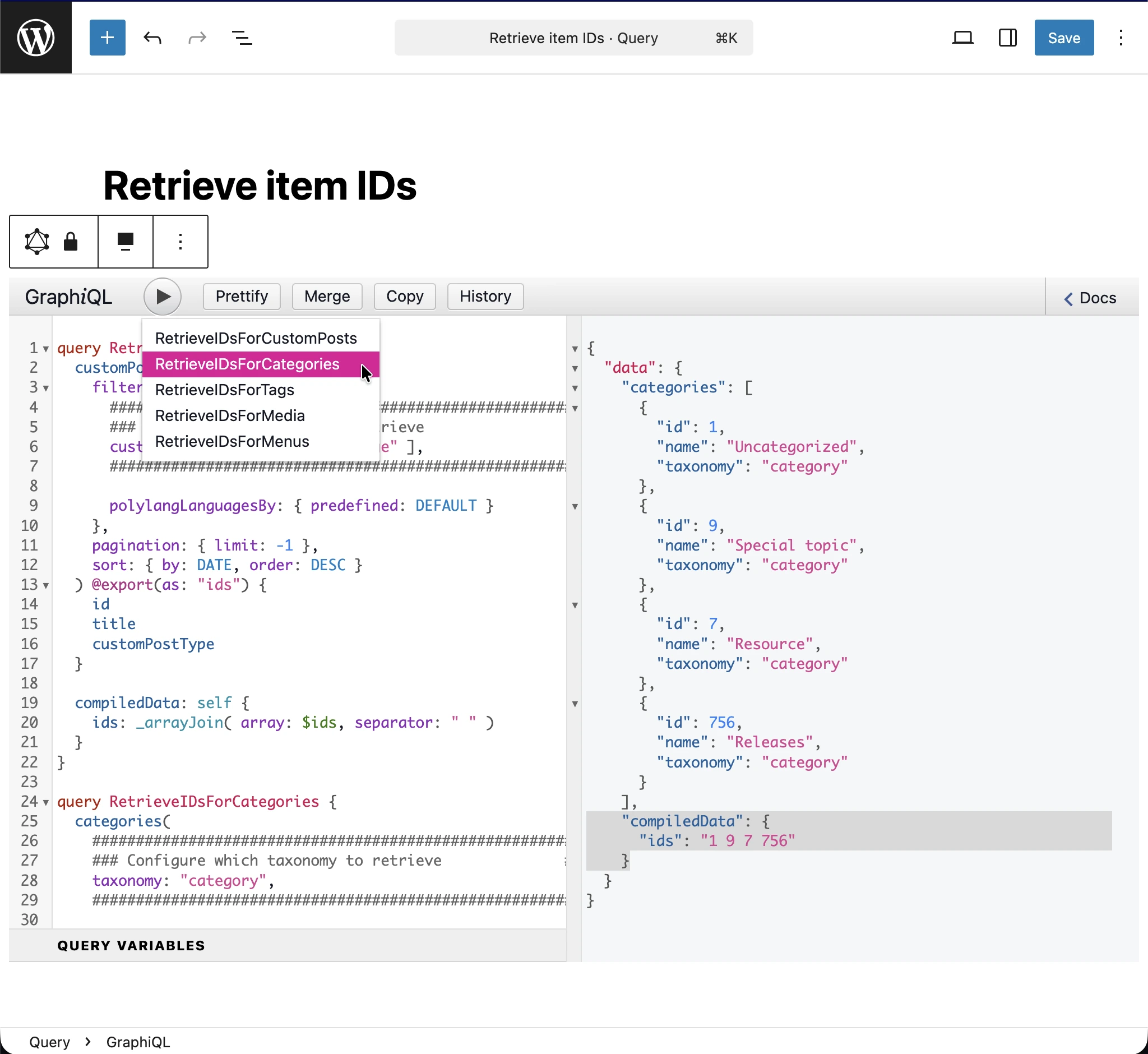
JSONレスポンスから、翻訳するアイテムのIDはエントリー data.compiledData.ids(画像でハイライト表示)に出力されます。その文字列をコピーして、設定ファイルの items 配列に保存してください。