

追加のElementorウィジェットを翻訳する
Gato AI Translations for Polylang は、ウィジェットベースのElementorページを翻訳できます。
このプラグインには すべてのElementorおよびElementor PROウィジェットのサポート が付属しています。カスタムまたはサードパーティのウィジェットについては、PHPフックを使用して翻訳サポートを拡張できます。
文字列の翻訳
Elementorウィジェットに追加の翻訳可能プロパティを宣言するには、gatompl:elementor_widget_type_translatable_properties フィルターを使用します。
このフィルターは [widgetName => properties] のマップを受け取ります。properties エントリには以下を含めることができます:
- フラットなコントロール名 — 例:
'author_name' - ドットパス — 例:
'author_avatar.alt'(settings.author_avatar.altに対応) - リピーターフィールド — サブ配列
[repeaterName => [...subFields]]として宣言
これらは自由に混在させることができ、ネストは任意の深さまで対応しています。
たとえば、次のフックを使用すると:
- フラットなコントロール
author_nameとドットパスauthor_avatar.altがblockquoteウィジェットで翻訳可能になります - リピーターのサブフィールド
nameがreviewsウィジェットのslidesリピーター内で翻訳可能になります
add_filter(
'gatompl:elementor_widget_type_translatable_properties',
static function (array $translatableProperties): array {
$translatableProperties['blockquote'][] = 'author_name';
$translatableProperties['blockquote'][] = 'author_avatar.alt';
$translatableProperties['reviews']['slides'][] = 'name';
return $translatableProperties;
}
);同じフィルターがシンプルなコントロールとリピーターフィールドの両方に対して機能します。リピーター専用のフックは別途ありません。
エンティティ参照の翻訳
プロパティには、翻訳時に対象言語の対応するエンティティに再マッピングする必要があるエンティティID(投稿、タクソノミータームのタクソノミー、メディアアイテム、またはメニュー)を格納できます。対応するフィルターを使用してください:
| 参照の種類 | フィルター |
|---|---|
| カスタム投稿とメディア | gatompl:elementor_widget_type_custompost_and_media_reference_properties |
| タクソノミーターム | gatompl:elementor_widget_type_taxonomy_term_reference_properties |
| IDによるメニュー | gatompl:elementor_widget_type_menu_reference_by_id_properties |
| スラッグによるメニュー | gatompl:elementor_widget_type_menu_reference_by_slug_properties |
形式は翻訳可能プロパティフィルターと同じです。フラット名、ドットパス、またはリピーター用のサブ配列を使用できます。
// Custom post / media reference
add_filter(
'gatompl:elementor_widget_type_custompost_and_media_reference_properties',
static function (array $properties): array {
$properties['featured-post'][] = 'post_id';
$properties['gallery']['items'][] = 'image_id';
return $properties;
}
);
// Taxonomy term reference
add_filter(
'gatompl:elementor_widget_type_taxonomy_term_reference_properties',
static function (array $properties): array {
$properties['related-category'][] = 'category_id';
return $properties;
}
);
// Menu reference by ID
add_filter(
'gatompl:elementor_widget_type_menu_reference_by_id_properties',
static function (array $properties): array {
$properties['menu-picker'][] = 'menu_id';
return $properties;
}
);
// Menu reference by slug
add_filter(
'gatompl:elementor_widget_type_menu_reference_by_slug_properties',
static function (array $properties): array {
$properties['menu-picker'][] = 'menu_slug';
return $properties;
}
);ウィジェット名とプロパティ名の確認方法
Translate custom posts GraphQLクエリを実行し、レスポンス内の elementorData フィールドを確認してください。各ウィジェットは widgetType と settings ツリーを公開しています。そこで、上記のフックに渡す必要があるプロパティ名(ネストされたドットパスやリピーターフィールドを含む)を確認できます。
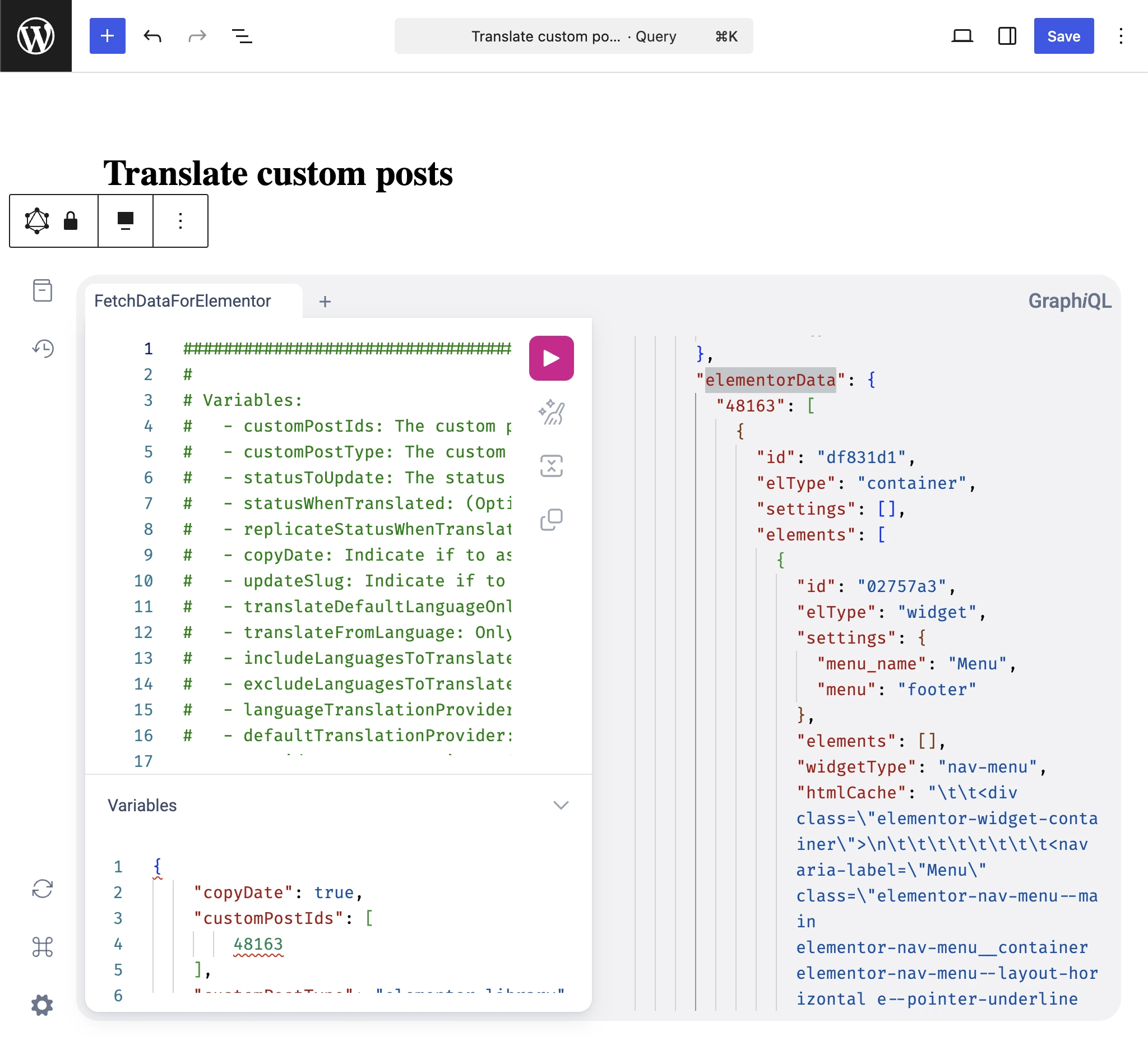
このクエリの実行方法については、ページビルダーデータの取得と翻訳 ガイドを参照してください。
サンプルの参照先
プラグイン自身の統合実装が役立つリファレンスになります。インストールしたプラグイン内の次のファイルを参照してください:
wp-content/plugins/gato-ai-translations-for-polylang/src/ConditionalOnContext/LicenseIsActive/ConditionalOnModule/Elementor/Constants/WidgetTypes.php