

投稿が翻訳されない
カスタム投稿が翻訳されない場合は、ログを確認して問題の原因を説明するエラーまたは警告エントリを探してください。
問題を解決するには、ニーズに合わせて設定を構成するか、投稿に古い/破損したデータが含まれている場合は投稿を再作成する必要があるかもしれません。
最も一般的な原因とその解決策は以下の通りです:
翻訳エントリが存在しない
次のような警告が表示される場合:
Warning [Query "translate-customposts"] Execution successful, but with warnings: 🟡 No custom post(s) was translated, because no translation entries exist. In the plugin Settings, enable the 'Automatic creation of translation entries' option for CPT 'post'; or otherwise, create those translation entries using Polylang (clicking on the '+' link), then trigger the translation....これは、カスタム投稿の翻訳エントリが(翻訳をトリガーする前に)作成されていないことを意味します。
プラグイン設定の General Configuration で、その CPT に対して Automatic creation of translation entries オプションが有効になっているか確認してください:
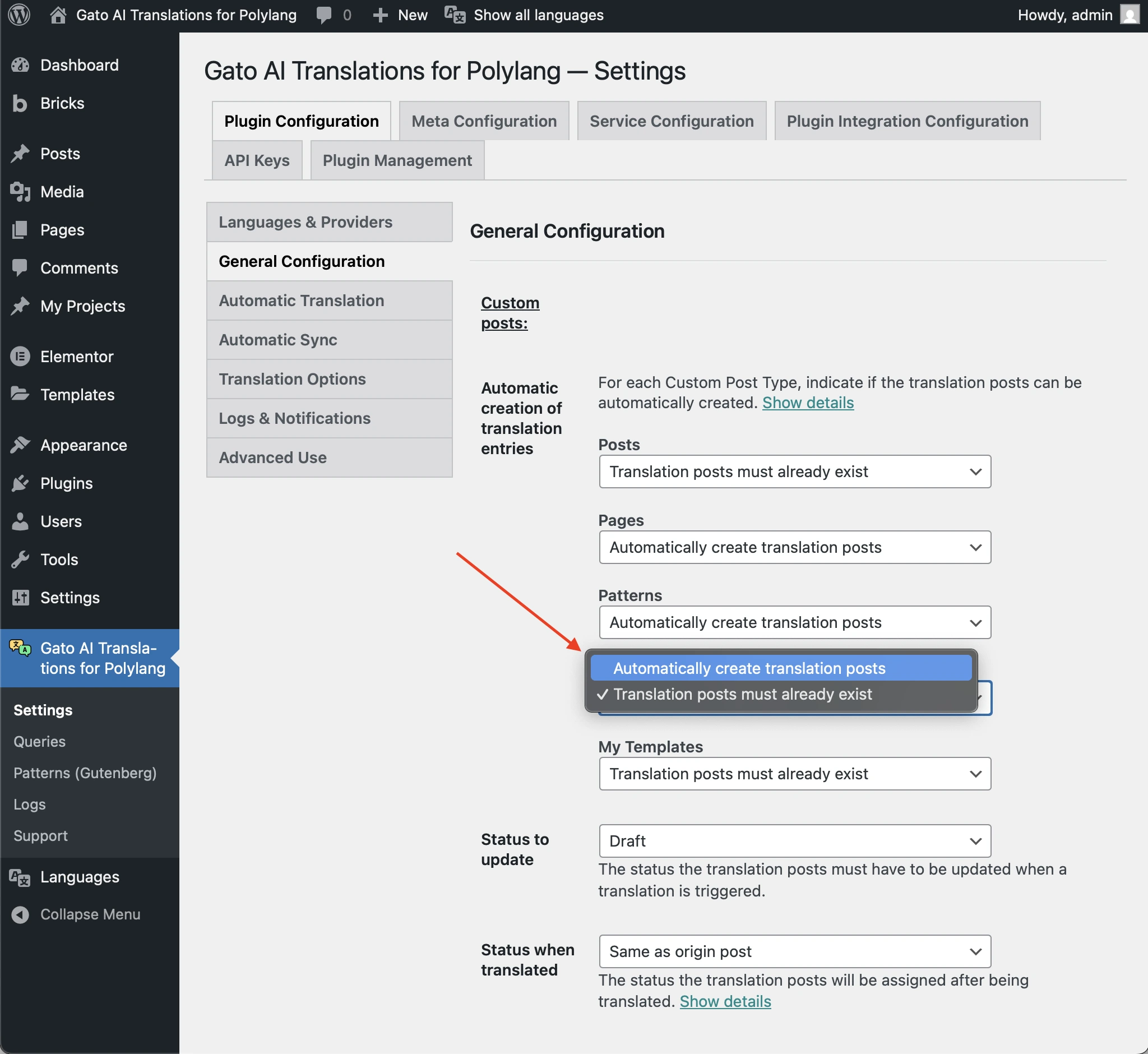
有効になっておらず、その CPT が wp_insert_post を使用してエントリを作成している場合は、そのオプションを有効にしてください。
そうでない場合は、まず Polylang を使用して(+ リンクをクリックして)翻訳エントリを作成してから、翻訳をトリガーする必要があります。
翻訳エントリに期待されるステータスがない
次のような警告が表示される場合:
Warning [Query "translate-customposts"] Execution successful, but with warnings: 🟡 No custom post(s) was translated, because the translation entries (CPT: 'post', IDs: [48634]) do not have the expected status: 'draft'. If this is unintended, either update the and/or 'Status to synchronize' options in the plugin Settings, or change the status of the translation entries accordingly....これは、翻訳エントリのステータスがプラグイン設定で構成されているものと異なることを意味します。
たとえば、Status to update オプションが draft に設定されており、翻訳エントリのステータスが publish である場合、翻訳は作成されません。
プラグイン設定の General Configuration で、Status to update オプションが期待されるステータスに設定されているか確認してください:
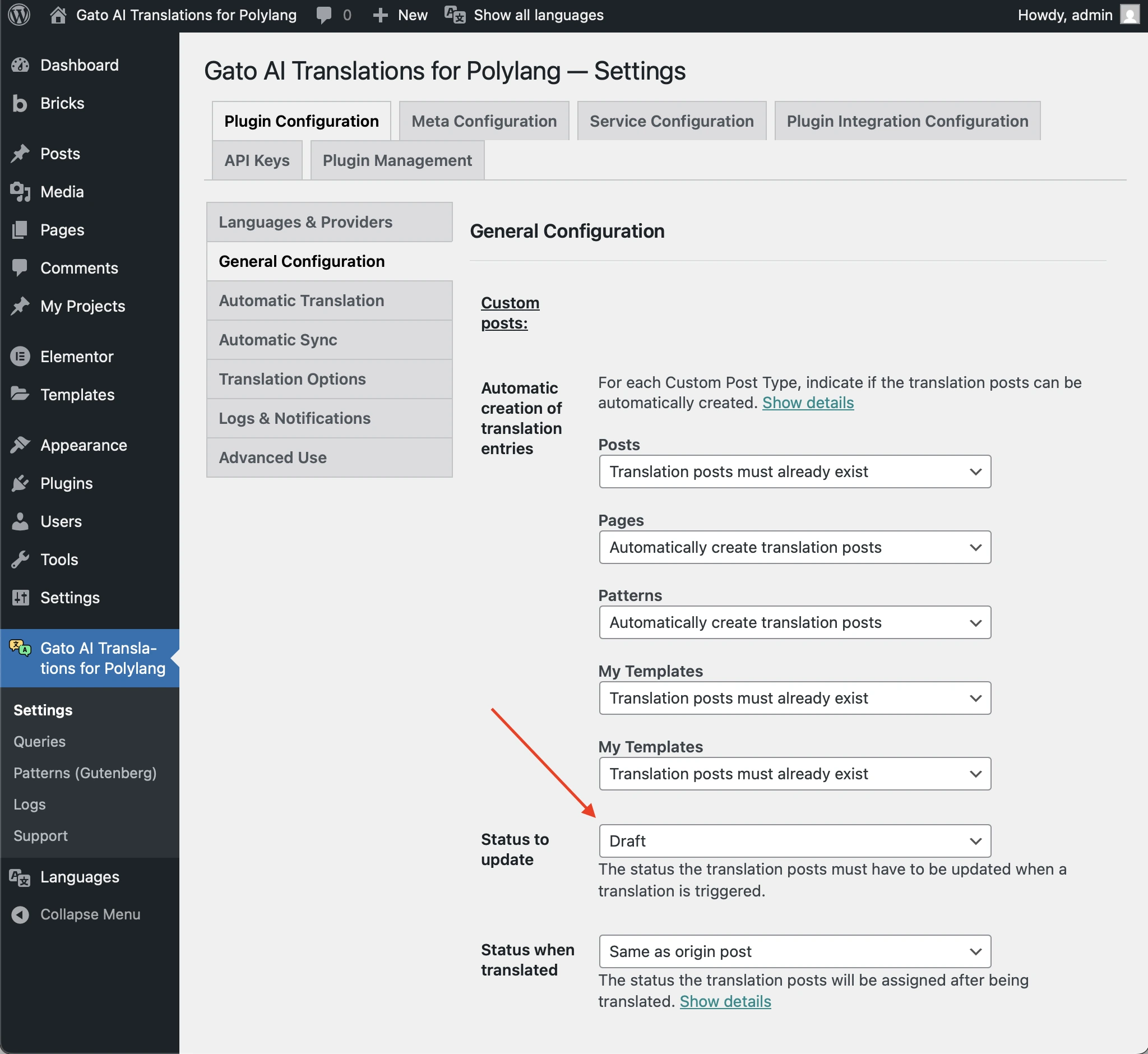
そうでない場合は、翻訳エントリのステータスをそれに合わせて変更してください。
投稿に古い/破損したデータが含まれている
次のような警告が表示される場合:
Warning [Query "translate-customposts"] Execution successful, but with warnings: 🟡 There are no custom posts to translate...そしてログエントリに、投稿に翻訳投稿があるにもかかわらずそれを認識しないことが示されている場合、投稿には削除が必要な古い/破損したデータが含まれている可能性があります。
たとえば、このログエントリの「Additional context」を確認してください:
{
"queryExecutionResponse": {
"data": {
"originCustomPosts": [
{
"__typename": "GenericCustomPost",
"id": 16597,
"polylangLanguageLocale": {
"code": "en"
},
"polylangLanguage": "en",
"originCustomPostHasDefaultLanguage": true,
"isTranslateFromLanguageProvided": true,
"originCustomPostHasSpecificLanguage": true,
"canTranslateOriginPostFromSpecificLanguage": true,
"canTranslateOriginPost": true,
"customPostIDTranslationCustomPostIDLanguageIDs": {
"es": 16613
},
"hasTranslationCustomPosts": true
}
],
"customPostIDTranslationCustomPostIds": {
"16597": [
16613
]
},
"translationCustomPostIdsList": [
[
16613
]
],
"translationCustomPostIds": [
16613
],
"translationCustomPostIdToCustomPostIDs": {
"16613": 16597
},
"emptyTranslationCustomPostVars": [],
"hasTranslationCustomPosts": false
}
}
}上記の例では、ID 16597 の英語の元投稿("id": 16597, "polylangLanguageLocale": { "code": "en" })にはID 16613 のスペイン語の翻訳投稿("customPostIDTranslationCustomPostIDLanguageIDs": { "es": 16613 })がありますが、それを認識していません("hasTranslationCustomPosts": false)。
この場合、ID 16613 の翻訳投稿はもはや存在しませんが、ID 16597 の投稿からその投稿への Polylang の関係が削除されていません。
この古い/破損したデータのため、プラグインは投稿の翻訳に失敗します。
問題を解決するには、元の投稿を再作成してそれを翻訳する必要があります。その後、破損した翻訳投稿を削除してください。